

CONTACT
Please contact us for shipping details.
An uninterruptible power supply (UPS) represents a foundational component for safeguarding sensitive electronic equipment from power disturbances. The internal battery within these units is a consumable component with a finite lifespan, typically requiring replacement every three to five years. This guide examines the process of selecting a suitable American Power Conversion (APC) battery replacement. It provides a structured methodology for users to identify their specific battery requirements by locating the UPS model or Replacement Battery Cartridge (RBC) number. The discourse evaluates the comparative merits of Original Equipment Manufacturer (OEM) batteries against third-party compatible solutions, considering factors such as cost, performance, and warranty. A detailed exploration of key battery specifications, including voltage, amp-hour ratings, and chemical composition like sealed lead-acid, is presented to empower informed decision-making. The article further outlines a practical, safety-oriented procedure for battery installation and concludes with best practices for maintenance to maximize the longevity of the new power source.
Before we embark on the practical steps of replacing a battery, it is beneficial to cultivate a deeper appreciation for the role these devices play in our technological lives. An uninterruptible power supply is more than a simple surge protector; it is a guardian standing watch over your digital world. Imagine for a moment the intricate web of data flowing through your computer as you work on a complex project, manage financial records, or connect with loved ones. A sudden power flicker, a brownout, or a complete outage can sever these connections in an instant, leading not just to inconvenience but to potential data corruption or hardware damage. The UPS provides a buffer, a momentary sanctuary of clean, consistent power, giving you precious time to save your work and shut down your equipment gracefully.
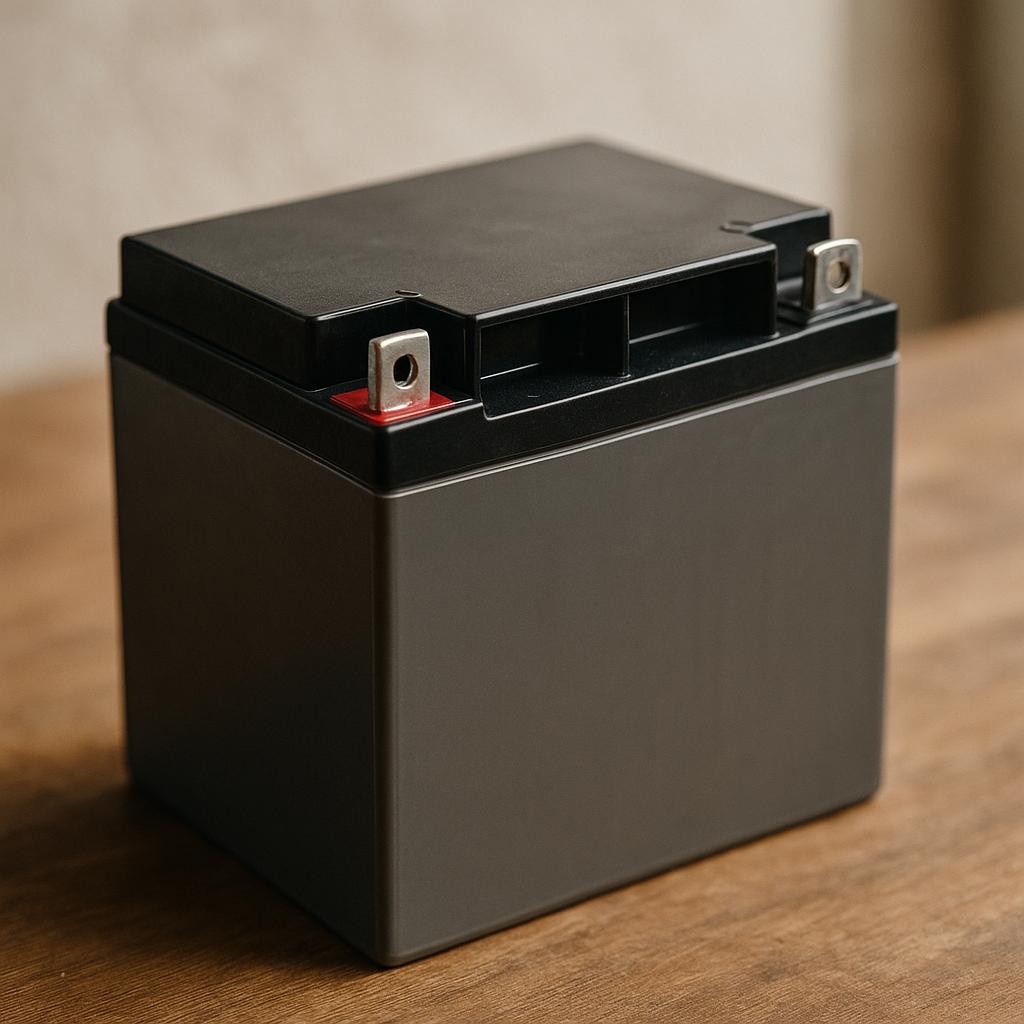
The heart of this guardian is its battery. Most commonly, the power source inside a consumer or small-business American Power Conversion battery system is a sealed lead-acid (SLA) battery. This technology is favored for its reliability, cost-effectiveness, and safety in an indoor environment. Unlike the flooded lead-acid batteries in many automobiles, SLA batteries are maintenance-free; the electrolyte is suspended in a gel or an absorbed glass mat (AGM), as noted by sources like ). This design prevents leaks and allows the battery to be operated in any orientation.
Yet, like all batteries, they are subject to the inescapable laws of chemistry and entropy. The process of charging and discharging, even when the battery is simply held at a full "float" charge, causes slow, irreversible chemical changes within its cells. Over time, tiny lead sulfate crystals form on the lead plates inside the battery. During a normal, shallow discharge, these crystals are small and are easily converted back during recharging. With deep discharges or prolonged time in a discharged state, these crystals grow larger and harder, a process known as sulfation. These larger crystals are difficult to dissolve, reducing the active surface area of the plates. The result is a diminished capacity to hold a charge. You might notice your five-minute runtime has dwindled to thirty seconds, or perhaps the UPS fails its self-test, emitting a persistent, mournful beep. This is the natural lifecycle of a UPS battery, a signal that its time of service is nearing its end. Environmental factors, particularly heat, can significantly accelerate this aging process. A UPS operating in a warm, poorly ventilated closet will experience a much shorter battery lifespan than one in a cool, open space. Recognizing that the battery is a consumable component, much like the ink in a printer or the tires on a car, is the first step toward responsible ownership.
The journey to restoring your UPS begins not with a purchase, but with a small act of investigation. The world of electronics is built on precision; a battery that is almost right is entirely wrong. Attempting to install an incorrectly sized or specified battery can lead to a poor fit, inadequate performance, or in a worst-case scenario, damage to the UPS unit itself. Therefore, our first task is to become a detective, to uncover the precise identity of the American Power Conversion battery your system requires.
The most straightforward path to identification often lies on the exterior of the UPS unit. Manufacturers place labels, typically on the back or bottom of the chassis, that contain a wealth of information. Lay the unit on its side or turn it around, perhaps with the help of a flashlight, and search for a sticker. You are looking for a "Model Number" or "SKU". For APC units, these numbers often follow a recognizable pattern, such as "BK650M," "BR1500G," or "SMT1000."
Think of this model number as the UPS's proper name. With this name, you can consult the manufacturer's documentation, or more conveniently, visit a specialized retailer's website, like PowerToolCell.com. These sites often feature a battery finder tool, as seen with similar tools from vendors like . By entering the UPS model number, the tool cross-references a database and presents you with the exact replacement battery cartridge needed. It is a wonderfully efficient process that removes nearly all guesswork.
In some cases, the model number might be worn, obscured, or you may simply wish for a more direct confirmation. APC simplifies this process by assigning a specific code to each battery configuration: the Replacement Battery Cartridge, or RBC, number. An RBC is not just a single battery cell; it is often a pre-assembled module of one or more batteries, sometimes including wiring, fuses, and connectors, designed for a tool-free, hot-swappable replacement.
To find the RBC number, you will likely need to open the battery compartment of your UPS. First, for safety, it is wise to power down and unplug the UPS from the wall. For most tower or desktop-style APC units, a sliding or hinged door on the bottom or front of the unit provides access. Once you slide the old battery cartridge out, inspect it closely. You should find a sticker on the cartridge itself bearing a code like "RBC2," "RBC7," or "RBC55."
This RBC number is the "gold standard" for identification. It defines the exact electrical specifications, physical dimensions, and connector types required. Searching for an "APC RBC7" will yield far more precise results than a generic search for a battery for a "1500VA UPS." It directly specifies the necessary American Power Conversion battery assembly.
What if the labels are gone? What if you have a bare battery with no clear markings? This situation is less common but not insurmountable. It requires a more hands-on approach. You will need to carefully examine the battery or batteries that came out of the UPS.
First, count the number of individual battery blocks. A small UPS might have one, while a larger one could have two, four, or more. Next, look for markings on the batteries themselves. You are searching for three key pieces of information:
With this collection of data—quantity, voltage, capacity, dimensions, and terminal type—you can manually search for a replacement. For example, your search might become "two 12V 7Ah batteries with F2 terminals." This method is more labor-intensive but ensures you can find a functional replacement even without the original model or RBC numbers.
Once you have successfully identified the required battery, you arrive at a significant crossroads: should you purchase an Original Equipment Manufacturer (OEM) battery, or opt for a third-party compatible replacement? This is not merely a question of brand loyalty but a complex decision involving considerations of cost, trust, performance, and warranty. There is no single correct answer for everyone; the optimal choice depends on your personal priorities and risk tolerance.
The OEM option, such as an official APC-branded RBC from a retailer like amazon.com, represents the path of least resistance and highest assurance. It is manufactured or certified by the same company that designed the UPS. The third-party option, from a specialist like PowerToolCell or , offers a compelling value proposition, often providing similar performance at a lower price point. Let us examine the arguments for each with a dispassionate eye.
| Feature | OEM (Original Equipment Manufacturer) Battery | Third-Party Compatible Battery (e.g., PowerToolCell) |
|---|---|---|
| Cost | Generally higher price point. | Typically 30-50% less expensive. |
| Compatibility | Guaranteed to be a perfect fit and match for the UPS. | High compatibility from reputable vendors; requires checking specs. |
| Performance | Meets the original specifications for runtime and lifespan. | Often meets or exceeds original specs; quality can vary by vendor. |
| Warranty | Usually backed by the UPS manufacturer's warranty. | Warranty provided by the third-party seller; terms may vary. |
| Convenience | Often sold as a complete, pre-assembled RBC kit. | May be sold as individual cells or as a complete kit. |
| Trust Factor | High trust in the brand name and quality control. | Trust is placed in the reputation and reviews of the third-party seller. |
Choosing an OEM American Power Conversion battery is an investment in certainty. The primary argument in its favor is the guarantee of perfect compatibility. The cartridge will slide in smoothly, the connectors will match precisely, and the battery's electrical characteristics are certified to work flawlessly with the UPS's charging and monitoring circuits. APC, for instance, invests significant engineering effort into testing their batteries with their hardware. This synergy ensures that the UPS can accurately predict runtime and battery health.
Furthermore, purchasing an OEM battery often preserves any remaining warranty on the UPS unit itself. Some manufacturers may stipulate that the use of non-certified batteries could void the warranty on the device. For a new or expensive UPS, this can be a weighty consideration. You are paying a premium not just for the battery itself, but for peace of mind and the elimination of variables. The OEM battery is the "known good" component, a direct replacement for what has worked reliably for years. It is a simple, plug-and-play solution that requires minimal research beyond identifying the correct RBC number.
The most powerful argument for choosing a third-party compatible battery is economic. These batteries, offered by specialized companies like PowerToolCell, can often be acquired for a fraction of the cost of their OEM counterparts. For older UPS units that are out of warranty, spending a large sum on an OEM battery may not be financially prudent, especially when the cost of the replacement approaches the cost of a new, modern UPS.
Reputable third-party vendors do not simply sell generic batteries. They specialize in the replacement market. They source high-quality sealed lead-acid cells from established battery manufacturers and assemble them into cartridges that are dimensionally and electrically identical to the OEM versions. In many instances, the cells used in both OEM and high-quality third-party cartridges come from the very same factories. The difference is in branding, distribution channels, and the associated marketing overhead.
A vendor like PowerToolCell builds its business on reputation. A pattern of selling subpar batteries would quickly lead to negative reviews and a loss of customer trust. Consequently, they have a strong incentive to ensure their products meet or even exceed the performance of the original. They typically offer their own warranties, which, while not from the UPS manufacturer, still provide protection against defects. For the savvy consumer who is comfortable verifying specifications and choosing a trusted seller, the third-party route can unlock significant savings without a meaningful compromise in performance or reliability. It empowers the user to get more value from their existing hardware, extending its life in a cost-effective manner.
There exists a middle path for the more hands-on user: rebuilding the existing RBC. An RBC is, at its core, a plastic housing containing standard-sized SLA batteries. Instead of buying a whole new cartridge, one can purchase only the individual battery cells. This involves opening the RBC casing (which may require removing screws or carefully prying open plastic tabs), disconnecting the wires from the old batteries, inserting the new ones, and reconnecting the wiring in the exact same configuration.
This method offers the greatest potential for cost savings. However, it requires a higher degree of technical confidence. You must be meticulous in replicating the wiring. The batteries in a multi-battery cartridge are often connected in series to increase the voltage (e.g., two 12V batteries become a 24V pack). Reversing the polarity (connecting positive to negative) could damage the UPS. This path is best suited for hobbyists or technicians who are comfortable with basic electronics and understand the risks involved.
To make a truly informed choice, especially when considering third-party options or rebuilding a cartridge, one must learn to speak the language of batteries. The numbers and acronyms printed on the side of a battery are not arbitrary; they are a concise summary of its capabilities and characteristics. Understanding these specifications allows you to compare different options on an equal footing and ensure you are selecting a battery that will not only work but will perform as expected. Let us demystify the most common terms you will encounter.
| Specification | Definition | Why It Matters for Your UPS | Common Values |
|---|---|---|---|
| Voltage (V) | The electrical potential difference between the battery's terminals. | Must match the original battery. Mismatching voltage can destroy the UPS. | 6V, 12V |
| Amp-Hour (Ah) | A measure of capacity; how much current the battery can deliver over time. | Determines the runtime. A higher Ah rating generally provides a longer runtime. | 7Ah, 9Ah, 12Ah, 18Ah |
| Chemistry | The internal materials used to store and release energy. | For APC UPS units, this is almost always Sealed Lead-Acid (SLA/VRLA/AGM). | SLA, AGM, Gel |
| Terminal Type | The size and shape of the metal connectors on top of the battery. | Must match the UPS wiring connectors for a proper fit. | F1 (4.75mm), F2 (6.35mm) |
| Dimensions (L x W x H) | The physical size of the battery case. | Must fit within the UPS battery compartment or RBC housing. | Varies by Ah rating |
Voltage is the most fundamental specification. Think of it as the electrical "pressure" the battery provides. The charging system and inverter within your UPS are designed for a very specific input voltage. For a single-battery UPS, this is typically 12V. For a unit with two batteries, they are usually wired in series (positive of one to negative of the other) to produce 24V (12V + 12V).
You must always replace your batteries with new ones of the same voltage. There is no flexibility here. Installing a 6V battery in a 12V system will result in it being overcharged and quickly destroyed. Conversely, installing a 12V battery where a 6V battery is expected could overload and damage the UPS's sensitive electronics. When you identify your American Power Conversion battery, confirming the voltage is the first and most foundational step.
The Amp-Hour (Ah) rating is a measure of the battery's energy storage capacity. A simple analogy is to think of it as the size of the fuel tank. A battery rated at 9Ah can, in theory, deliver 9 amps of current for one hour, or 1 amp for 9 hours. In the context of a UPS, a higher Ah rating translates directly to a longer runtime when the power goes out.
Here, you have some flexibility. It is often possible to replace a standard battery with a slightly higher-capacity version, provided it shares the same voltage and physical dimensions. For example, many UPS units that ship with 12V 7Ah or 12V 7.5Ah batteries can physically accommodate a 12V 9Ah battery of the same footprint. This can be a cost-effective way to get 15-25% more runtime. Your UPS will not be harmed by the higher capacity; it will simply take a bit longer to recharge the battery from a fully depleted state. When browsing options from a supplier like PowerToolCell, you may see these "high-capacity" upgrade options listed.
As mentioned earlier, the vast majority of consumer UPS systems use Sealed Lead-Acid (SLA) batteries. This is a broad category that includes a few sub-types, with Absorbed Glass Mat (AGM) being the most prevalent. In an AGM battery, the sulfuric acid electrolyte is absorbed into a fine fiberglass mat layered between the lead plates. This construction makes the battery spill-proof, vibration-resistant, and maintenance-free, a key insight from sources like ).
While SLA is the standard, a newer technology is beginning to appear in high-end UPS models: Lithium-Ion (Li-ion). Li-ion batteries, similar to those in your laptop or smartphone, offer significant advantages. They are much lighter, can endure many more charge-discharge cycles, and can have a much longer overall lifespan (8-10 years compared to 3-5 for SLA). However, they are also significantly more expensive and require a completely different, more complex charging and management system. You cannot simply swap an SLA battery for a Li-ion battery in a UPS designed for SLA. You must replace like with like. For the overwhelming majority of APC battery replacements in 2026, you will be purchasing an SLA/AGM battery.
The final pieces of the puzzle are physical. The terminals are the contact points for the power cables. The two dominant sizes are F1 and F2, with F2 being slightly wider. The connectors on your UPS's wires are designed for one size. While adapters exist to convert F1 to F2 or vice versa, it is far simpler to purchase a battery with the correct terminals from the start. A close visual inspection of your old battery's terminals is usually sufficient.
Finally, measure the physical length, width, and height of the battery. While batteries with the same voltage and Ah rating are often standardized, there can be slight variations between manufacturers. Ensure the replacement you are considering will physically fit inside the tight confines of the UPS battery compartment or the RBC plastic shell. A battery that is a few millimeters too tall may prevent the compartment door from closing, rendering it useless for your application.
With the correct replacement American Power Conversion battery in hand, the final step is the physical exchange. For many, this part can seem intimidating. We are often taught to be wary of electricity and batteries. However, the process for most consumer UPS units is designed to be straightforward and safe, often requiring no tools at all. By approaching the task with a calm, methodical mindset and prioritizing safety, you can complete the replacement with confidence.
Before you begin, create a safe and clear environment.
While the 12V or 24V DC voltage of the batteries is generally not a shock hazard to dry skin, the batteries can deliver a very high current if short-circuited. A metal tool, a piece of jewelry like a ring or bracelet, or a loose wire accidentally bridging the positive and negative terminals can create a large spark, generate intense heat, and potentially damage the battery or the UPS. Always be mindful of where your tools and hands are.
The exact procedure will vary slightly depending on your APC model (e.g., a tower unit versus a rack-mounted one), but the general principles are universal.
Your UPS is now physically renewed. The final act is to re-integrate it and let it recognize its new power source.
You have successfully replaced your American Power Conversion battery. The immediate crisis is averted, and your equipment is once again protected. However, your role as a responsible owner is not quite finished. By adopting a few simple habits and understanding the environmental needs of your UPS, you can significantly extend the service life of your new battery, ensuring you get the maximum value from your investment. Think of this not as a chore, but as a way to cultivate a healthier, more resilient power environment.
The single greatest adversary to the lifespan of an SLA battery is excessive heat. The chemical reactions inside a battery are temperature-dependent. Higher temperatures accelerate these reactions—both the useful ones that provide power and the undesirable ones that cause aging and degradation. A common rule of thumb in the battery industry is that for every 8-10°C (15-18°F) increase in average operating temperature above the ideal 25°C (77°F), the battery's expected service life is cut in half.
What does this mean in practical terms?
There is a persistent myth, held over from the days of older Nickel-Cadmium (Ni-Cd) batteries, known as the "memory effect." This was a phenomenon where a battery that was repeatedly shallowly discharged would "remember" that level and refuse to deliver its full capacity.
Sealed Lead-Acid batteries do not suffer from this memory effect. In fact, the opposite is true. Deeply discharging an SLA battery is far more stressful for it than keeping it at or near a full charge. The UPS is designed to do just that: it keeps the battery on a "float charge," a low-level current that holds it at 100% capacity, ready for an outage. Therefore, there is no need to periodically unplug your UPS to "exercise" the battery. Doing so unnecessarily cycles the battery and shortens its life. The only time a deep discharge is recommended is during the initial calibration.
Your UPS is a self-monitoring device. Most APC units will automatically perform a brief self-test every two weeks. During this test, the unit switches to battery power for a few seconds to check the battery's ability to handle a load. You will hear a click, the unit may beep, and then it will click back to utility power. This is normal and healthy.
If the UPS fails this self-test, it will alert you, typically with a continuous beep and a flashing "replace battery" light. This is your signal that the battery's health has degraded to a point where it can no longer be trusted.
Beyond the automatic tests, it is good practice to initiate a manual self-test once every few months. This can usually be done by pressing and holding the power button for a few seconds until the unit beeps. This proactive check can give you an early warning that the battery is weakening, allowing you to plan for a replacement before it fails completely.
Your old battery, though depleted, is not inert trash. It contains lead and sulfuric acid, materials that are harmful to the environment if they end up in a landfill. However, these materials are also highly recyclable. In fact, lead-acid batteries are one of the most successfully recycled consumer products in the world.
Never throw an old UPS battery in your regular household garbage. Most reputable battery retailers, including auto parts stores and specialized battery shops like , accept old lead-acid batteries for recycling, often free of charge. Many municipalities also have household hazardous waste collection days or facilities that will take them. When you purchase a replacement American Power Conversion battery from a store like PowerToolCell, they often provide information or programs for recycling your old one. Taking this final step completes the cycle of responsible ownership.
How often should I replace my American Power Conversion battery?
Typically, an APC UPS battery has a service life of 3 to 5 years. This can vary based on usage, the frequency of power outages, and especially the ambient operating temperature. If the UPS is in a warm environment, you may need to replace it closer to the 3-year mark. Most APC units will alert you with a "replace battery" indicator when the time comes.
What does the constant beeping from my UPS mean?
A constant, solid tone or a persistent beeping (not the intermittent beeping that indicates a power outage) combined with a flashing red light is almost always the UPS signaling that the internal battery has failed its self-test and needs to be replaced. It can no longer guarantee it can support a load during an outage.
Can I use a battery with a higher Amp-Hour (Ah) rating than the original?
Yes, in many cases you can. As long as the voltage, physical dimensions, and terminal type are the same, using a battery with a higher Ah rating (e.g., swapping a 7Ah for a 9Ah) is a safe way to increase your runtime. The UPS will simply take a bit longer to fully recharge the larger-capacity battery.
Is it safe for me to replace the UPS battery myself?
For most consumer and small office APC models, the answer is yes. The process is designed to be user-friendly and often tool-free. By following basic safety precautions—powering down the unit, unplugging it from the wall, and being careful not to short-circuit the terminals—the replacement process is very safe.
How do I properly dispose of my old UPS battery?
You must not dispose of a lead-acid battery in your regular trash. It contains hazardous materials but is also highly recyclable. Take it to a designated battery recycling center. Most auto parts stores, electronics stores, or specialized battery retailers will accept them for recycling at no cost.
The process of selecting and replacing an American Power Conversion battery, when approached with care and understanding, transcends a simple maintenance task. It becomes an exercise in self-reliance, a deliberate act to secure the continuity of one's digital life and work. By demystifying the technology, from the model numbers on the case to the chemical reactions within the cells, we transform an intimidating black box into a comprehensible and manageable tool. The choice between an OEM and a third-party solution is not just about cost but about a personal calculation of value, trust, and confidence. Safely installing the new battery and cultivating its longevity through proper care are acts of stewardship over the equipment that serves us. In a world increasingly dependent on stable power, mastering this small corner of it grants a measure of autonomy and peace of mind, ensuring that when the lights flicker, your world remains bright.
Bishop, T. (2023, September 1). Battery types, technologies, and common sizes. Pale Blue Earth. https://paleblueearth.com/blogs/news/types-of-batteries?srsltid=AfmBOopX8GzKObyKYRtYRbMGafwCwnkSNPGInLett6qcu7rO00ijk8lY
Generac Power Systems, Inc. (2023, July 11). Generac PWRcell® battery installation and owner’s manual. Generac.
Keeppower Technology Co., Ltd. (2024). Products - Keeppower high capacity battery selection. Keeppower.
Linden, D., & Reddy, T. B. (Eds.). (2002). Handbook of batteries (3rd ed.). McGraw-Hill.
Renogy Marketing Team. (2023, April 20). All-encompassing guide to solar battery chargers. Renogy. https://www.renogy.com/learning-center/solar-basic/battery-charger-101/solar-battery-charger-guide?srsltid=AfmBOoqVtwvcqzJJYTEsfN2fts2gXLfZeD0XknuyA-hnAzF8yeR6qVd
Schneider Electric. (2021). White paper 46: The effect of temperature on battery life. APC. +Paper&pFileName=VAVR-5YJRENR3EN.pdf&pDocRef=SPDVAVR-5YJRENEN
{"one"=>"Select 2 or 3 items to compare", "other"=>"{{ count }} of 3 items selected"}